Vortex Terminal is an advanced strategic analysis engine that shifts the paradigm from tracking raw, independent “numbers” to analyzing the underlying, immutable geometry of probability. Built upon sophisticated mathematical models—including Topological Data Analysis, Markov Chains, and Dynamic Time Warping (DTW)—the terminal translates the chaos of global lottery systems (such as EuroMillions, Mega Millions, and Powerball) into an actionable, visual matrix.
Rather than relying on blind luck or simple statistics, the Vortex Engine maps every changing number to a fixed “Vortex Address,” uniquely categorized by global city climates (from the freezing, dormant zones of Yakutsk to the hyper-active, hot sectors of Miami). By tracking “Address Energy,” historical flow pathways, and “Dominant DNA Patterns” that account for more than 50% of historical outcomes, users can step out of a chaotic sea of millions of possibilities and build data-driven strategies within a highly structured mathematical corridor.
Vortex Terminal does not predict the future; it provides the ultimate analytical compass for reading the echoes of the past, understanding the rhythm of the matrix, and governing the architecture of chance.
Accessing the Strategy Engine
Accessing the complex mathematical corridor of probability begins with a secure and authenticated connection to the Vortex Terminal. The interface is optimized to initialize only through encrypted (HTTPS) pathways. You can launch the strategy engine through three dedicated official channels:
1. Main Site Navigation: Visit the home base at axisbrief.com and select the specialized “USE VORTEX TERMINAL“ tab located in the primary navigation menu.
2. Direct URL Entry: Enter the dedicated strategy subdomain directly into your browser’s address bar: vortex.axisbrief.com.
3. Secure Search Results: Search for authorized keywords such as “Vortex Terminal Axis Brief” on major search engines and ensure you select results that initiate an official, secure (HTTPS) link.
Initial Overview & Initializing the Matrix
Upon initialization, the terminal’s main visualization grid calibrates. You will be presented with the comprehensive structural dashboard, including specialized analytical panels such as the Top 10 DNA Log, the live Combination Pool, the historical Archive, and the advanced Evaluate Engine. Surrounding the central matrix, you will observe the advanced topological tools, including the Vortex Space-Time Radar and the Vortex Global System Overview.
Defining Your Strategic System
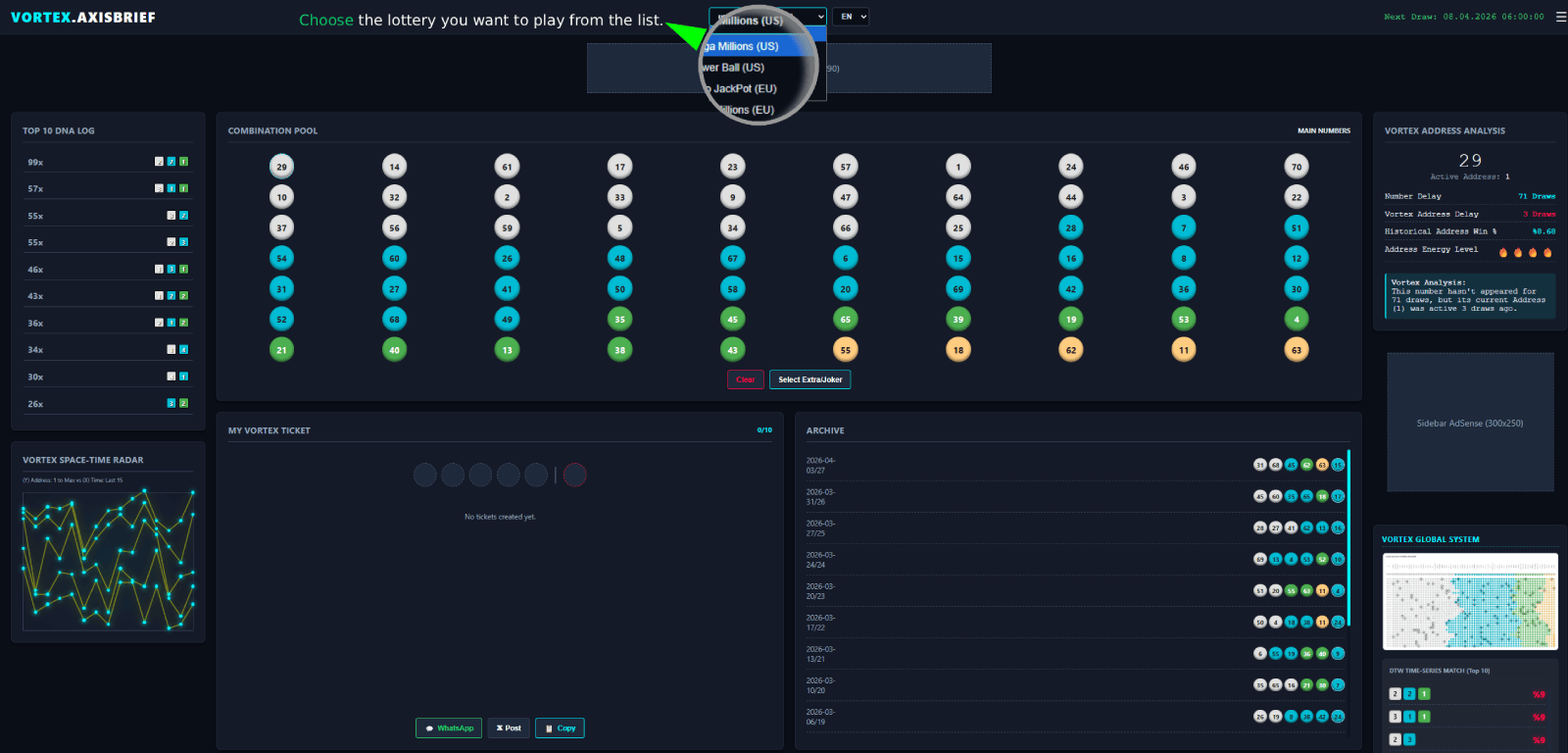
As highlighted in the main visualization, the first strategic action is selecting the specific chaotic system you wish to govern.
Locate the Lottery Selector dropdown menu at the top center of the interface. To populate the visual matrix with specific historical data and recalculate the Geometry of Chaos, simply click the menu and select your strategic target—such as Mega Millions (US), EuroMillions (EU), or Powerball (US). The entire terminal then recalibrates to align with that specific mathematical architecture.
Multilingual Intelligence Suite
Vortex Terminal is engineered as a truly global engine, governing probability across distinct international mathematical corridors.
To accommodate strategists from diverse regions and ensure seamless navigation of the Geometry of Chaos, the terminal features a comprehensive, built-in Multi-Language Suite.
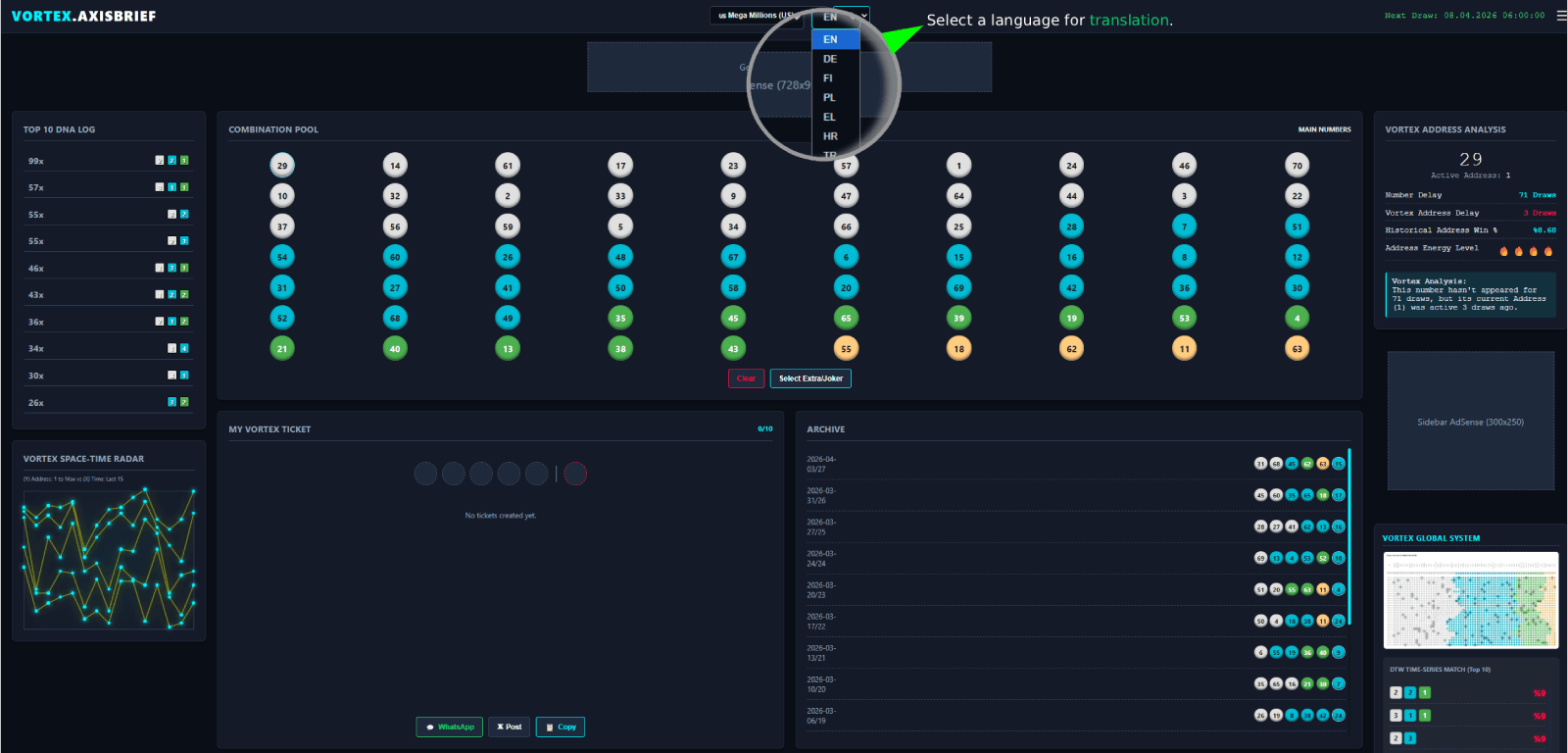
As highlighted in the main visualization, the terminal allows users to experience the interface and all analytical outputs in their native tongue. Locate the specialized Language Selector dropdown menu at the top center of the structural dashboard, typically positioned immediately next to the Lottery Selector.
This localized intelligence tool is not limited to simple button translations. When a language is selected, the terminal instantly localizes the complex Vortex Address Analysis, the dynamic, actionable data from the Evaluate Engine, and all structural labels across the dashboard. Simply click and select to realign the terminal’s textual matrix with your strategic context.
Accessibility First: The Color Blind Option
Vortex Terminal is committed to providing a comprehensive and universally accessible strategic platform. We recognize that the core analytical power of the terminal relies heavily on visual data interpretation—such as Vortex Address Energy Mapping (hot vs. cold zones), DNA Pattern distinction, and dynamic visual indicators. To ensure that every strategist, regardless of color vision, can effectively ‘read’ the matrix, we have integrated a sophisticated Color Blind Mode.
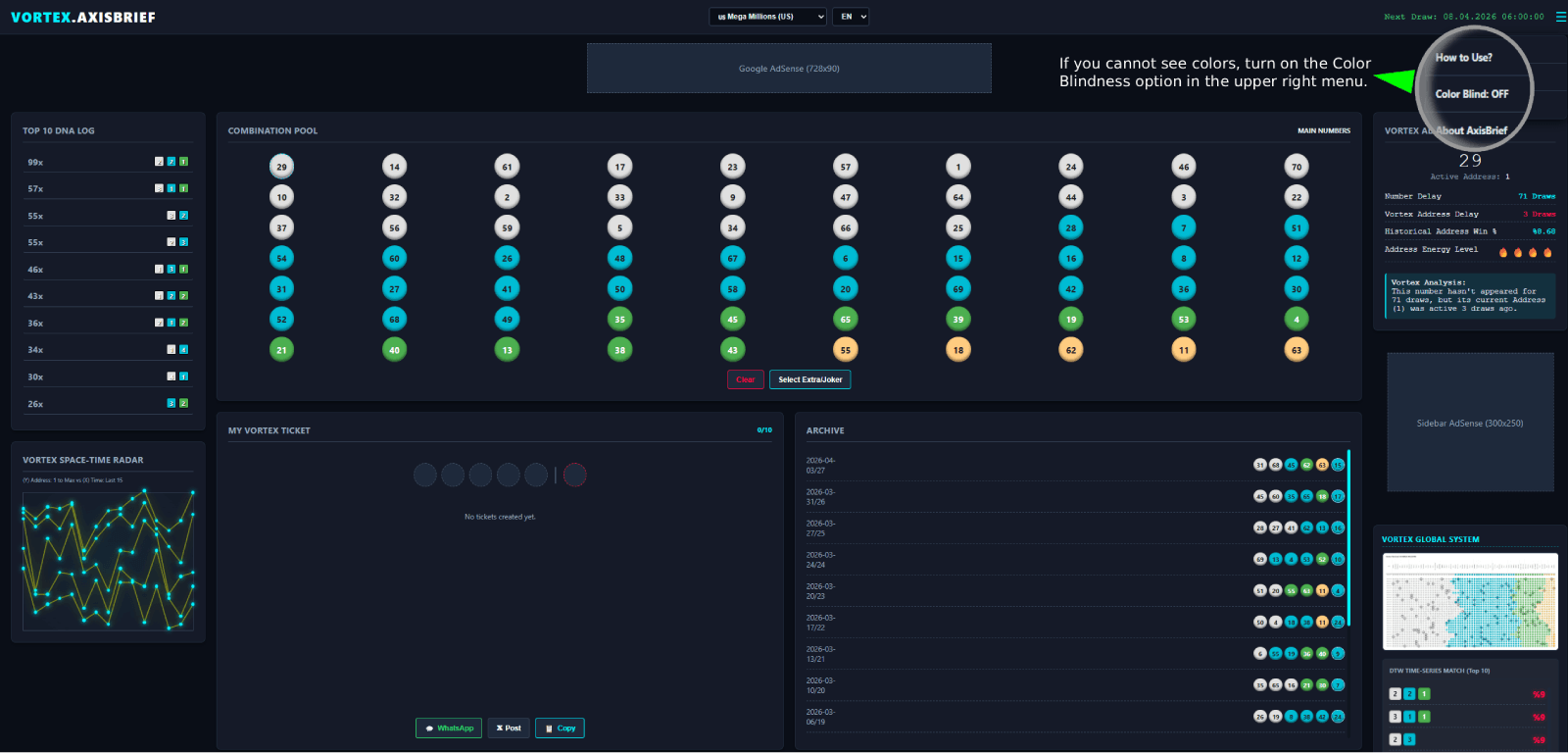
As highlighted in the visual, a green arrow points to the dedicated accessibility control. If you experience color vision deficiencies, you should immediately calibrate the interface for optimal visibility. Access the menu by clicking the profile/settings icon in the extreme upper-right corner of the structural dashboard. Within this menu, simply locate and toggle the ‘Color Blind’ option.
Calibrating the Structural Matrix
Activating this mode instantly shifts the terminal’s color palette. It recalibrates the contrast, brightness, and color relationships across all visual elements. This ensures that the dynamic “Invisible Threads” between numbers, the distinct Vortex Addresses, and the various data logs are clearly distinguishable, enabling every analyst to confidently govern the geometry of probability. The wait is over. Ensure your visual input is as precise as your strategic logic.
Understanding the Combination Pool
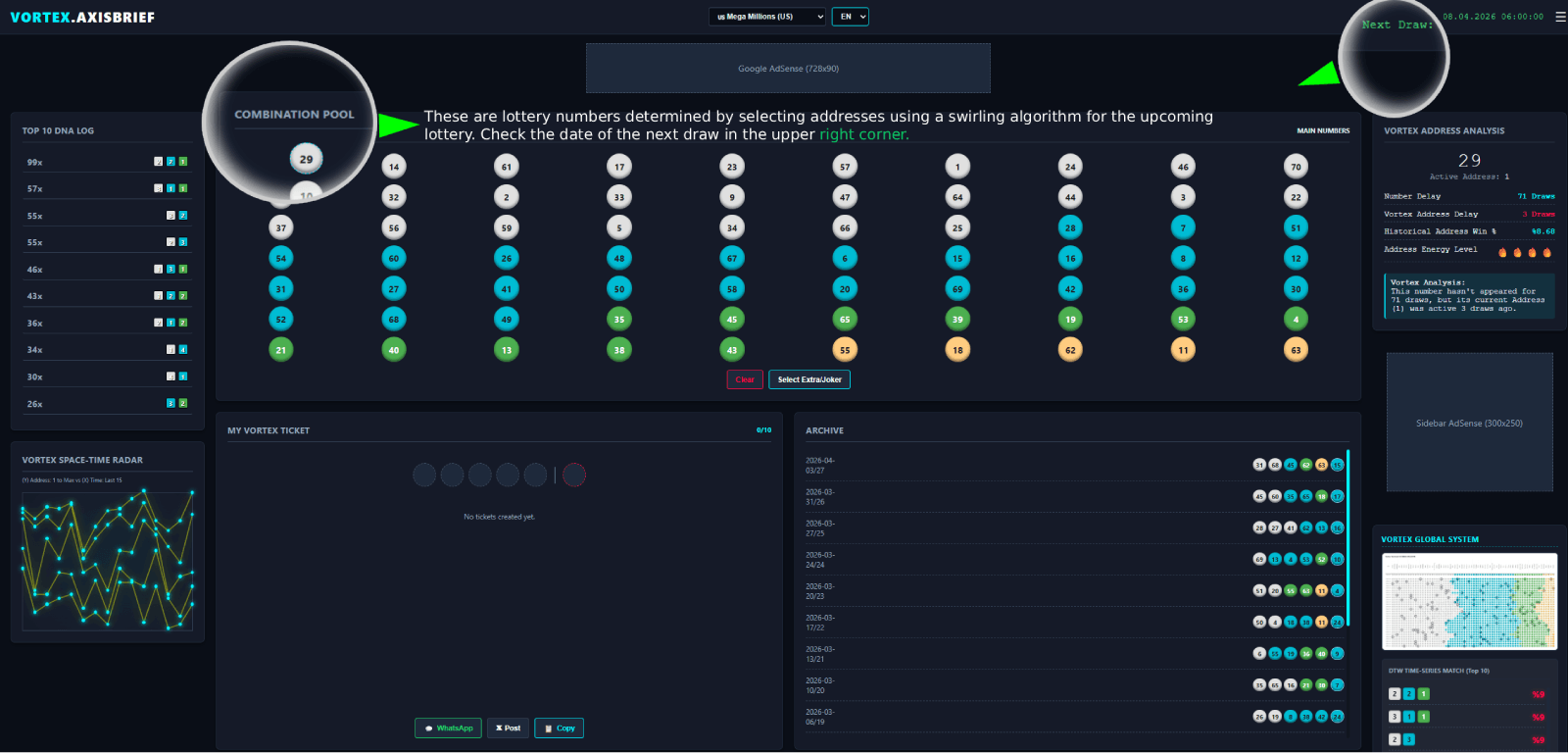
As indicated by the first green arrow in the visualization, the large central section of the matrix is the Combination Pool. This area is the vital interface for visualizing the mathematical output of the terminal’s algorithms.
The Combination Pool is not a generator of random numbers. Instead, it displays specific combinations of main numbers (balls) that have been mapped to precise, high-probability Vortex Addresses using our proprietary “swirling algorithm” (the Vortex Pattern). The numbers you observe highlighted or glowing are the active, selected components of a strategy generated by analyzing the underlying geometry of chaos. The combination pool acts as the bridge between theoretical analysis and an actionable strategic ticket.
Identifying Your Strategic Window
Crucially, every mathematical model must be calibrated within a specific temporal context. Look to the upper right corner of the structural dashboard, indicated by the second green arrow in the image.
Here, you will find a real-time timestamp labeled “Next Draw.” This field explicitly states the exact date and time of the specific upcoming lottery draw for which the entire terminal—including the Top 10 DNA Log, the Address Energy Levels, and the Combination Pool—is currently calibrated.
Strategists MUST confirm that this timestamp aligns with their target draw before validating any combination within the matrix (the Vortex Space-Time coordinates)
Strategic DNA Profiling & The Dominant Matrix
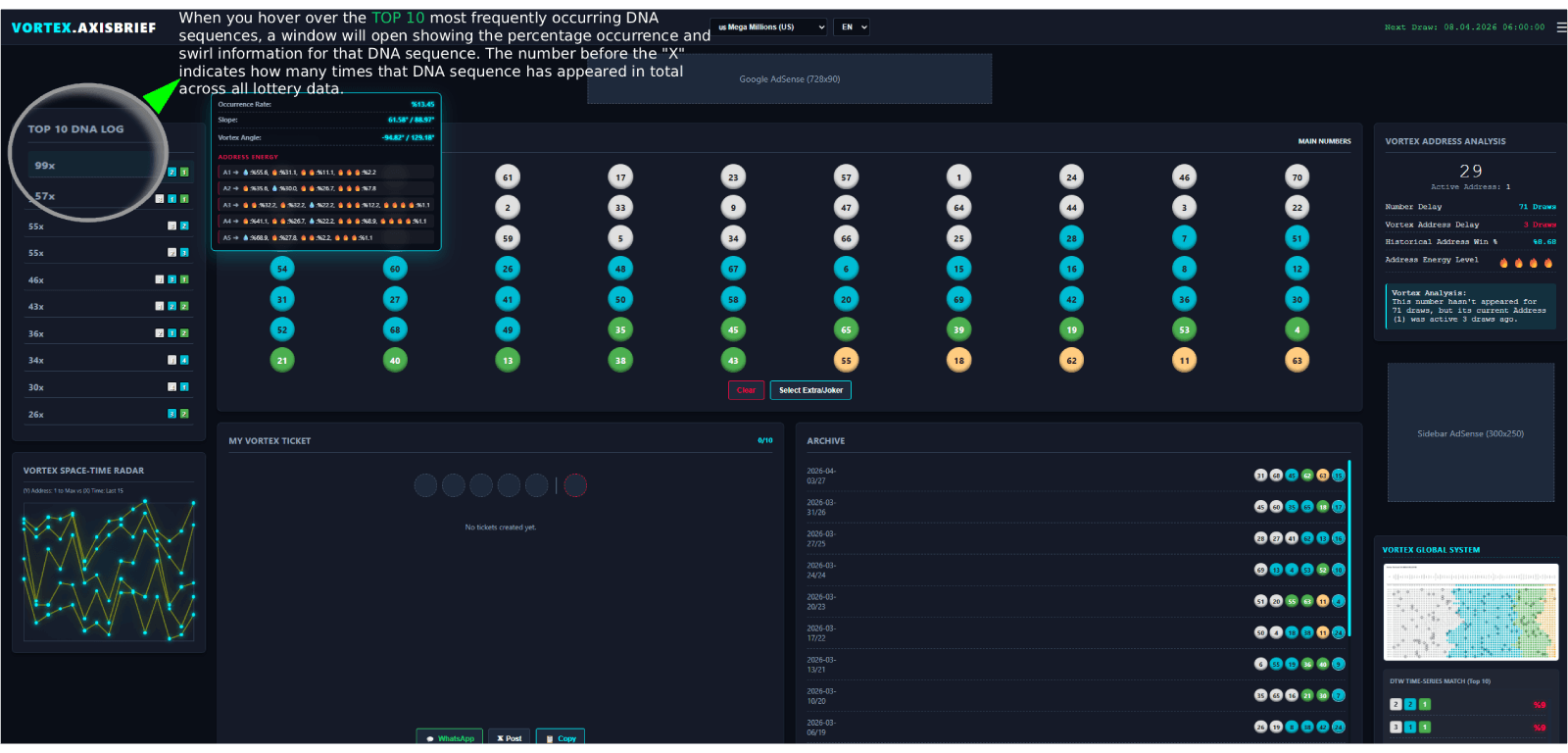
The next step in governing the geometry of probability is to analyze the historical cadence of dominant statistical configurations. Locate the TOP 10 DNA LOG panel on the far left of the dashboard. This is not a static list; it is a live, actionable register of the most powerful and frequently occurring DNA sequences within your selected chaotic system.
When you hover your cursor over a specific entry (such as the one marked 99x), an advanced analysis pop-up window instantly opens, revealing a multi-layered matrix of precise, data-driven vectors:
- Occurrence Count (e.g., 99x): This number indicates the absolute total count of historical lottery draws in which this exact DNA sequence has been validated across all terminal data. It is a direct metric of historical validation.
- Occurrence Rate & Key Vectors: The window calculates the Occurrence Rate (%), the complex Slope of the sequence’s recent flow, and the precise Vortex Angle determined by our swirling algorithm. These metrics are the DNA of chaos, defining how a sequence moves through the probability field.
- Address Energy & Heat Trends: The lower section of the pop-up, labeled ADDRESS ENERGY, maps every single ball/number within that sequence to its current thermal state. Using the logic from our Heat Trend Analysis—tracking zones from freezing Yakutsk to fiery Miami—you can observe real-time indicators for each Vortex Address (A1-A5). Look for indicators suggesting Hyper-Active (🔥) or Hyper-Dormant (❄️) zones to understand which addresses are primed for a potential phase shift.
Strategist’s Tip: Use this deeper profile to validate the combinations proposed in the Combination Pool. As established in our primary Case Studies, dominant DNA patterns account for more than 50% of historical outcomes. Calibrating your strategy based on these verified configurations significantly narrows the mathematical corridor of opportunity.
DNA Patterns: The Genetic Code of Chaos
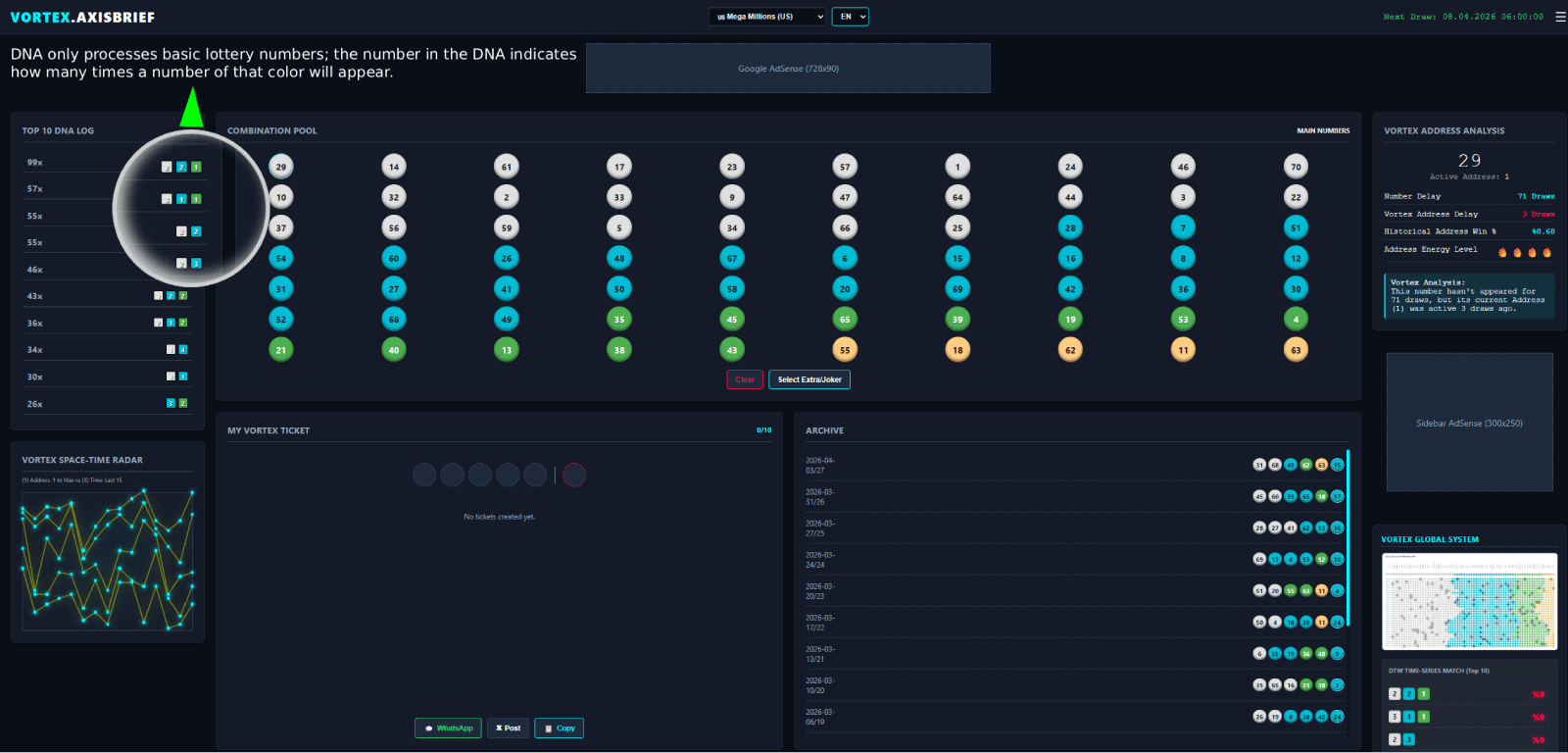
As highlighted in the visualization, Vortex Terminal transcends the analysis of raw “numbers” and focuses on the underlying, immutable DNA Patterns of probability. This panel, reveals the most powerful statistical configurations within your selected chaotic system.
Look closely at the highlighted small colored boxes next to a DNA sequence (such as the one indicating a 99x historical validation). These boxes are the building blocks of the matrix’s genetic code. They translate raw data into dynamic, actionable energy maps:
- Colors Represent Thermal Zones: The colors themselves are not arbitrary. Building on the heat trend analysis from our original Case Studies, they represent distinct thermal/geographical address groups—from the freezing, dormant zones of Yakutsk (indicated by the coolest color, often blue) to the hyper-active, hot sectors of Miami (the warmest color, often orange).
- Numbers Indicate Distribution: The single digit within each colored box (e.g., ‘2’ in a blue box, ‘2’ in a green box, and ‘1’ in an orange box) explicitly indicates exactly how many main numbers within that combination come from that specific thermal address group. The sum of these numbers equals the total count of main numbers in a single combination (e.g., 5).
By focusing on these patterns, strategists can effectively map the thermal/geographical distribution of any combination. As established in Axis Brief’s primary research, dominant DNA patterns account for more than 50% of historical outcomes. Utilizing this data-driven validation allows you to align your strategy with the validated configurations most likely to emerge from the chaos.
Vortex Space-Time Radar: Mapping the Topology of Chaos
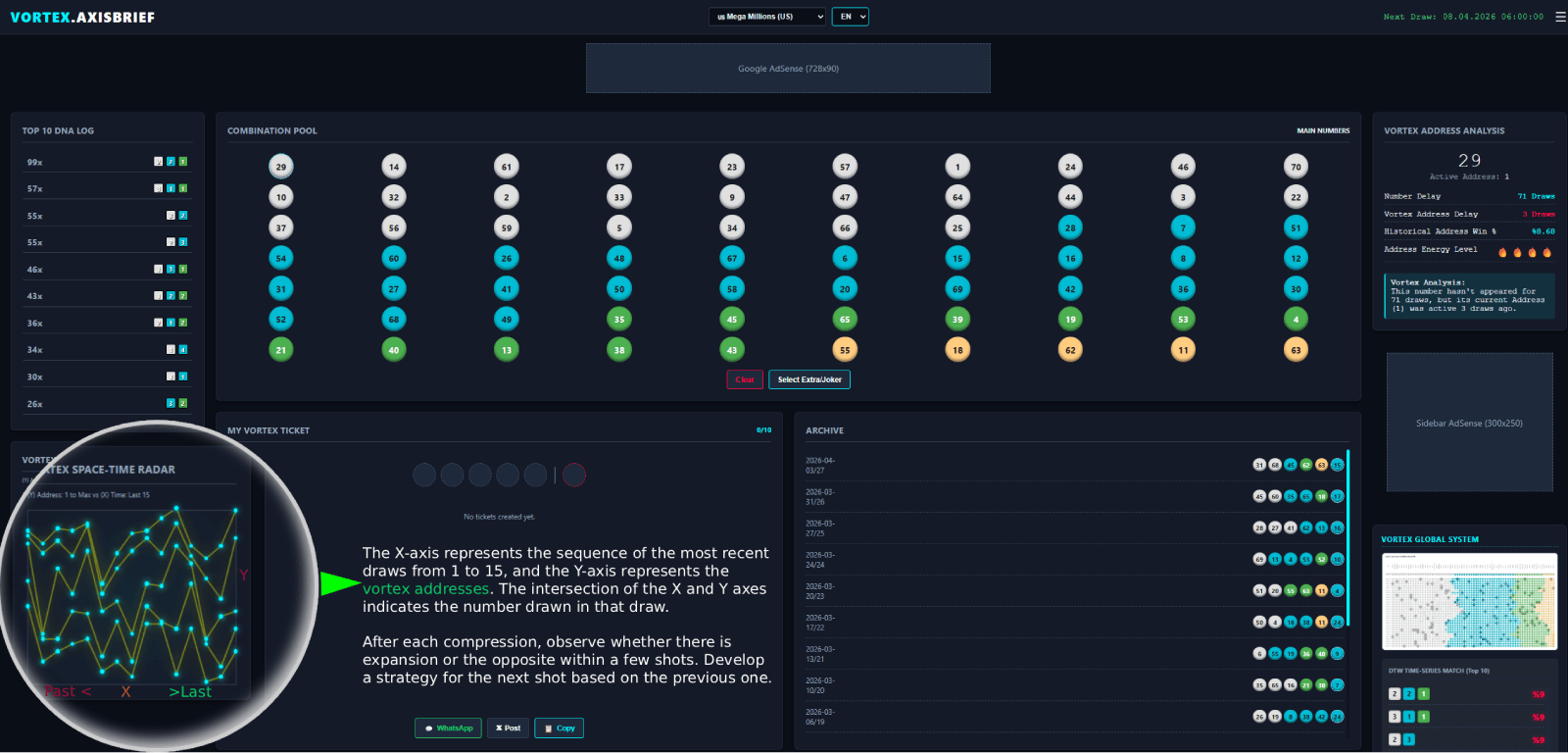
As highlighted in the visual, the ultimate tool for governing the architecture of chance is located in the bottom-left panel: the VORTEX SPACE-TIME RADAR. This panel maps the topology of recent draws, providing a powerful visual metaphor for understanding the underlying, immutable geometry of chaos established in our original Case Studies.
By shifting the focus from individual, changing “numbers” to their fixed Vortex Addresses, this radar allows you to analyze exactly how winning numbers move through the probability field over time.
- Understanding the Matrix Axes:
- X-Axis (Horizontal): Represents the sequence of the most recent lottery draws, typically the last 15. The labels show a temporal flow, moving from the oldest draws on the left (Past <) to the most recent on the right (> Last). This is the time dimension.
- Y-Axis (Vertical): Represents the comprehensive list of 1-15 fixed Vortex Addresses. Building on our thermal/geographical zone logic, these addresses are directly categorized by distinct global city climates—from the freezing, dormant zones of Yakutsk (lowest addresses) to the hyper-active, hot sectors of Miami (highest addresses). This is the spatial dimension within the terminal’s matrix.
- Mapping the Visual Texture: The individual points and connecting lines are not arbitrary; they reveal the visual “texture” of the historical data. The points indicate which specific Vortex Address contained a number drawn in that particular draw, and the lines track the sequential movement.
Strategic Observation: Compression vs. Expansion
The instructions in the visual, marked in green, are paramount for strategic analysis. After the terminal compresses the data, your primary task is to observe the dynamic relationship between Compression and Expansion:
- Compression (Tight Cluster): Look for vertical columns with minimal vertical spread, suggesting that several winning numbers were concentrated within a very narrow band of Vortex Addresses (e.g., all from warm or all from freezing zones).
- Expansion (Broad Spread): Observe draws with wide vertical separation, indicating numbers are dispersed across the entire thermal grid—from Yakutsk to Miami.
Strategist’s Tip: After each observed compression, carefully monitor subsequent draws. Significant compressions are often followed by an equal and opposite expansion within a few draws, as the matrix attempts to return to equilibrium. Use this rhythmic, almost “breathing” pattern to analyze whether there is expansion or the opposite. Build your strategy for the next shot based on the topological movement observed in the previous ones, identifying which fixed addresses (and the numbers within them) are primed for a potential phase shift. Governance of chaos begins here.
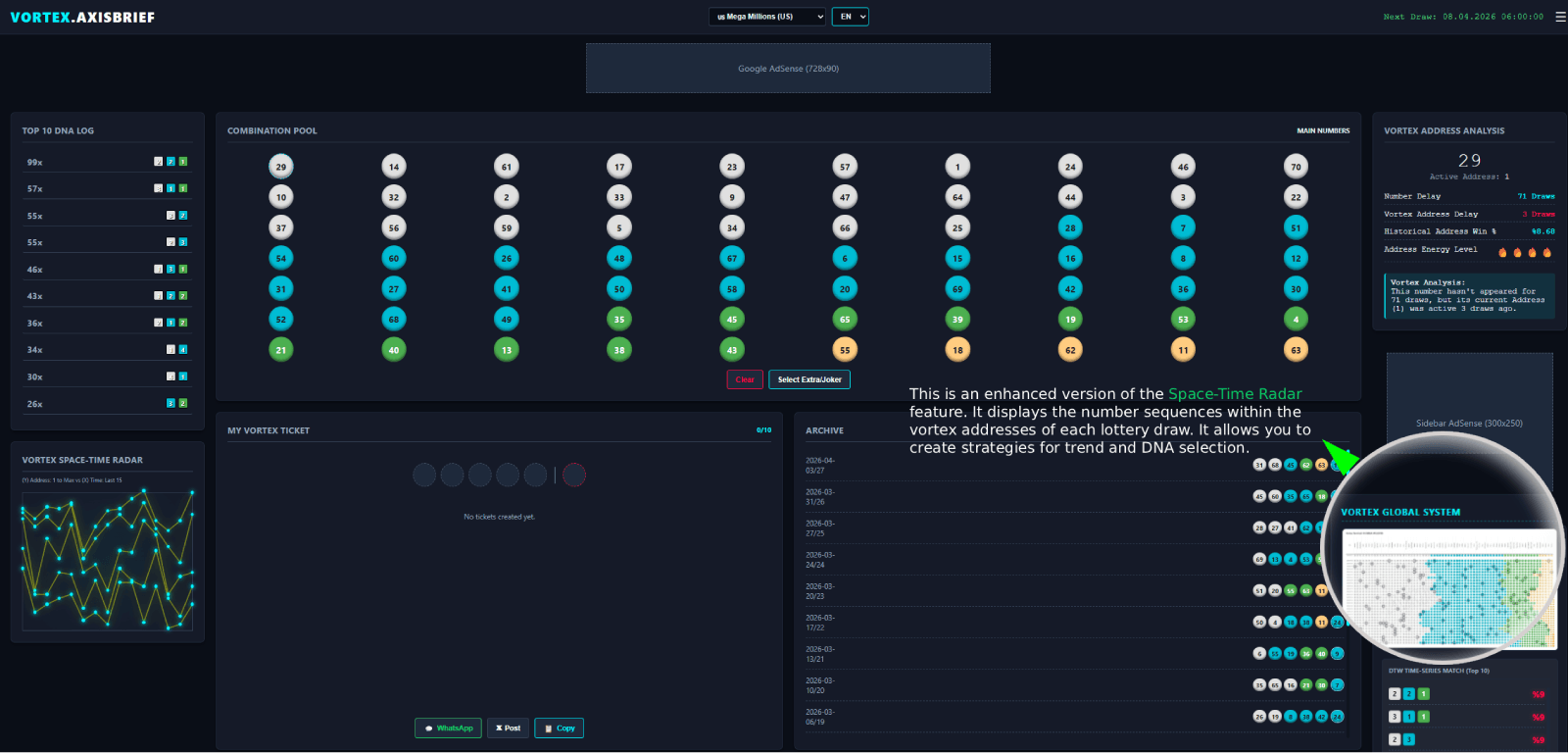
Vortex Global System & Thermal Address Key
The next critical phase in mastering the geometry of chaos is understanding the comprehensive visual language of the terminal’s thermal logic. This is achieved via the VORTEX GLOBAL SYSTEM compass. This essential panel, located in the bottom-right corner of the terminal, serves as the definitive structural compass, explaining exactly how fixed Vortex Addresses are paired to the distinct thermal/geographical zones established in Axis Brief’s core Case Studies.
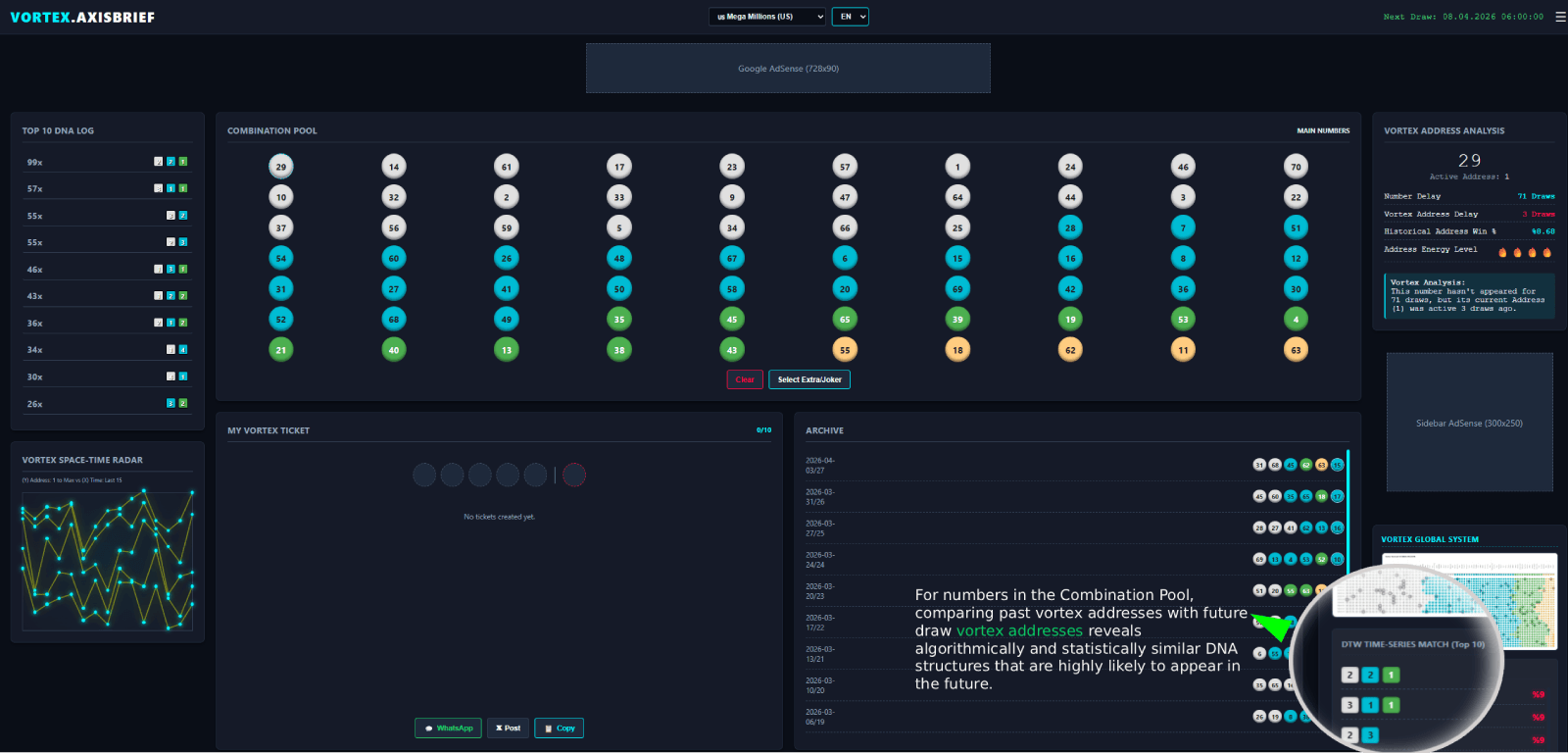
Uncovering the Rhythm of Chaos
Building on the foundation established in Axis Brief’s core Case Studies, the ultimate mastery of chance requires finding the rhythm within the chaos. This is the precise function of the DTW TIME-
SERIES MATCH (TOP 10) panel, located immediately below the Vortex Global System display.
Dynamic Time Warping (DTW)
DTW is an advanced time-series analysis algorithm used to measure the similarity between two sequences which may vary in time or speed. Within the terminal’s architecture, as detailed in The Vortex Series (Part 06), this powerful tool is calibrated to analyze the intricate historical flow of Vortex Addresses.
Finding the Echoes of the Past
Look closely at the data register indicated by the green arrow and zoom view. As explicitly stated in the visualization, this panel allows you to validate combinations within the Combination Pool. It achieves this by:
Time-Warping DNA Structures: It algorithmically compares past, immutable sequences of Vortex Addresses (specific DNA structures) with the potential configurations generated for future draws.
Structuring Your Strategy: Creating the Vortex Ticket
The final step in navigating the complex geometry of probability is synthesizing your analysis into an actionable strategy. The Vortex Terminal streamlines this process through the intuitive combination selection and ticket generation interface. This is where theory translates into a tangible, strategic set of numbers.
1. Defining Your Path: Guided vs. Free Selection
You have two primary pathways for building your strategy within the matrix:
- Guided Strategy (DNA Selection): For a highly structured approach, begin by selecting a dominant DNA sequence from the Top 10 DNA Log. When you activate a specific DNA profile, the Combination Pool dynamically recalibrates. It will act as a strategic compass, highlighting compatible numbers and visually warning you against selections that deviate from your chosen mathematical corridor. This minimizes the risk of structurally unsound combinations.
- Free Selection Mode: If your analysis of the Vortex Space-Time Radar and Heat Trends dictates a unique approach, you can build your combination entirely manually. The Combination Pool remains fully functional, allowing you to freely select any number within the system.
2. Deep Analysis: The Vortex Address Window
As you interact with the Combination Pool, precision is paramount. Clicking or selecting any individual number instantly activates the Vortex Address Analysis panel on the right side of the dashboard. This window provides an immediate, deep-dive profile of that specific number, detailing its current thermal state, historical frequency, and its fixed Vortex Address. This ensures every single selection is backed by data, not intuition.
3. Completing the Sequence: Main Numbers and Jokers
Continue selecting your main numbers within the Combination Pool. The terminal will track your progress. Once you have successfully fulfilled the required quota of main numbers for your chosen chaotic system (e.g., selecting 5 numbers for EuroMillions), the terminal automatically transitions to the next phase. The Combination Pool will refresh to display the available Extra/Joker numbers (if applicable to your selected lottery), guiding you to complete the structural sequence.
4. Ticket Generation and Management
Upon finalizing both your main and extra numbers, finalize the process by clicking Add Ticket. This action instantly transfers your completed strategic sequence to the My Vortex Ticket registry, located in the lower-middle section of the dashboard.
- Multi-Ticket Strategy: You can govern multiple probabilities simultaneously. The terminal allows you to compile and manage up to 10 distinct tickets per session.
- Ticket Controls: Within the My Vortex Ticket area, you maintain full control. You can Edit existing tickets to tweak your strategy or Delete those that no longer align with your analysis.
- The Evaluate Engine: Before finalizing your session, utilize the powerful Evaluate button. This engine runs a final, comprehensive diagnostic on your selected tickets, assessing their overall structural integrity and alignment with current global Vortex patterns.
5. Session Security and Export Options
The Vortex Terminal prioritizes your privacy and data security. We do not store your strategic selections on our servers. Your session data is entirely local; if you close your browser or refresh the page, your tickets will be permanently cleared.
To preserve your generated strategies before exiting:
- Use the WhatsApp or X (Twitter) integration buttons to securely share your structural output.
- Use the Copy function to save your ticket data directly to your device’s clipboard for external storage.
We wish you precise strategic analysis and optimal outcomes.
For a deeper understanding of the underlying mathematical models and advanced tactical applications, please explore the comprehensive Case Studies section on Axis Brief.